


Brand Spotlight


There’s a certain kind of satisfaction that comes from bringing a machine back to life. For one woodturner, that moment started with a silent lathe, a failed VFD, and a decision to tackle the repair head-on instead of replacing an otherwise dependable machine. What followed was equal parts troubleshooting, wiring, problem-solving, persistence and a little help from modern automation technology along the way.
This customer success story is the work of Rich Egan, a member of Central Rapid Woodturners.
Thank you so much Rich for sharing your story with us!
Powermatic 3520B VFD Replacement
Shortly before Christmas 2025 I went to start my lathe for a project and found it
completely lifeless. The front panel RPM display worked, but nothing else. After
some investigation and testing, I determined my VFD – Variable Frequency
Drive – had failed and would need repair or replacement. This is the story of my
journey getting that done.
What is a VFD and what does it do?
In simple terms, the VFD on your lathe converts the single-phase power
available in your home to three-phase power to run the motor on your lathe.
A three-phase motor allows features like variable speed and reverse which
are very useful on a wood lathe. VFDs are available in almost unlimited
models to match motors and other electronic devices of various sizes. The
plate on the side of your motor will give all the specifications needed to
select a VFD to match that motor.
Choosing a new VFD
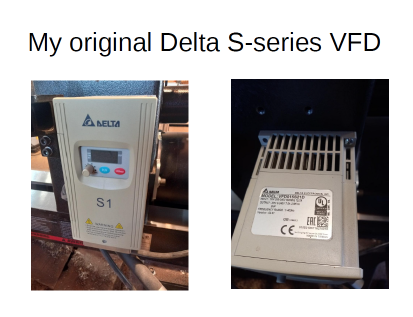 The internet provided many options to replace my VFD. The easiest would be to
purchase a new Delta S-series. The wiring pinouts would be the same, and
Powermatic supplies the programming parameters recommended for their lathe
motors. Unfortunately, my lathe is about 20 years old, and the S-series VFD is no longer manufactured.
They are available on Ebay as used or refurbished units, but this seemed to me a short term solution without tech support, so I felt buying a new model was a better plan, even if there would be some wiring changes and a need to program parameters
Delta VFD Model VFD015S21A
This is the model number for my original VFD supplied by Powermatic. I found it
is a very common model used by a number of manufacturers for their wood
lathes, including Jet and Laguna. Check that magic box behind your headstock.
You may have the same model.
Delta MS-300 Series VFD
I phoned a Delta VFD distributor, GALCO, and found the current
replacement for the S-series with my model number is a Delta model
VFD7A5MS21ANSAA. This falls under the new MS-300 line of controllers.
Searching this part number via our internet friend found a number of
distributors who carry this model. Pricing and shipping costs vary, so pick
your best deal. I found a distributor in Illinois, Marshall Wolf Automation, who
had the unit in stock, and I had it the next day with standard shipping. They
say they are a female-owned company, which seemed cool to me as well. A
sales rep emailed me a couple days later to be sure the product had arrived
OK and to see if I had any trouble with installation. That is uncommon, so
kudos to Marshall Wolf.
So now the real fun begins – oh baby
So now I had what I needed to begin. Doesn’t look too bad, I thought. You must
understand I am a trained electronic technician. I know which end of a soldering
iron gets hot, and I am familiar with motors and controls, and the associated
voltages. If you are not comfortable with these things, find someone to help you.
You might save time and aggravation. You will need to strip and install wires.
You have to understand and follow wiring diagrams. You will have to understand
and change parameters in the VFD programming to make it run your lathe motor
the way you like.
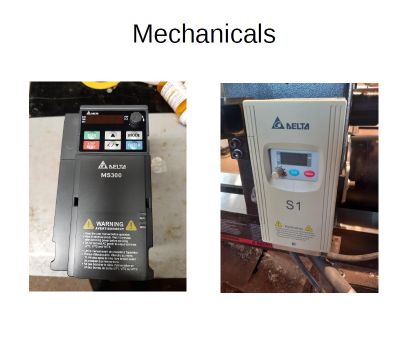 You will have to remove the old failed VFD to install the new one. Start by unplugging the power cord so nothing is energized. Again, if you are uncomfortable with these things, ask for help. All the wiring, both power and control can probably be reused. You can label each as to the terminal it is
attached. The new connections will be similar. When checking the mounting location for your new VFD, see if the old wires will reach the new terminals so
you can avoid splicing or replacing them.
The Two VFDs are not the same physical size. The S-series was mounted to the
rear of the headstock with four tapped holes and four socket-head cap screws. I
decided not to drill and tap new holes in the headstock. I found a piece of
plywood large enough to cover the old mounting holes and attached it with new
screws. They are #10x24. I could now mount the new MS-300 to the plywood
with short wood screws. Be aware some of the screw holes go all the way
through the casting, so a too-long screw could interfere with a pulley inside. I
watched a video on replacing a VFD, and that person decided to build a small
enclosure to protect the new VFD from dust, chips and damages. That seemed
like a good idea.
High voltage connections
A VFD converts single-phase house power to three-phase power for the lathe
motor. All these involve potentially dangerous voltages. Get help if you need it.
Your input power will be single phase 220 from your house. There will probably
be three wires, the colors may vary. Power leads go to L1 and L2 and the
ground lead to ground. The motor will have one lead for each phase (three total)
and a ground lead. Motor leads go to T1, T2 and T3, or U, V and W. Again,
colors may vary. Put them down in the same order as the old VFD. If you flip two
leads your motor may run in the wrong direction. If so, flip any two leads of the
motor wiring.
Take note of the small red and grey wires doubled up with the 220V input wiring.
These wires lead into the headstock with the rest of the wiring to the front
controls, but they do not end there. This is the power to the front panel RPM
display. It operates independently of the VFD. Remember those small wires
have 220 VAC and show them some respect.
These power connections should get your new VFD powered up. Resist the
temptation to fire up the motor and start turning. Though it will probably run,
there are motor parameters to set in the VFD to make things run properly. You
will also not have any control from any of the front panel knobs and switches on
your lathe. The low-voltage control circuits need to be wired correctly and
correct parameters set so the VFD will recognize them.
Low Voltage Control Circuits
Our wood lathes need front panel controls accessible to the user. This is for both
safety and convenience. It is common to have an on/off switch or button, a
switch to control forward/reverse, and a knob to adjust variable speed. All these
controls require correct wiring to the VFD and adjustments to some VFD
parameters to make it recognize inputs from these front controls.
The old S-series VFD had wire terminals with screw clamps. The MS-300 has
spring-loaded clamps for the small control wires. Use a small straight blade
screwdriver to depress the little tab above the terminal to compress the spring
clamp inside. Then insert the wire and release the clamp. Give the wire a little
tug to be sure it is connected. It helps if the wires are tinned, or coated with
solder. It makes the wire stiffer and easier to work with. If you know how to
solder it is a simple step. Mine were already tinned.
It is necessary to add this additional common wire because unlike
the old S-series, the logic common for MS-300 Fwd/Rev and
start/stop and speed control are separate connections and each
requires its own common connection. So the Yellow wire from the
speed control is +10V, the green is AVI and the common blue is
ACM. Fwd/Rev white wire is MI1, black wire is MI2 and the added
common wire (in my case red) replacing the old blue wire, goes to
DCM.
Adjusting VFD Parameters
Getting the new MS-300 VFD to operate the Powermatic motor only requires
changing a few parameters. Section 05 sets up motor specifications. All that
information is on the motor plate. Section 00 tells the VFD to look for input from
the front panel controls. Section 01 sets maximum RPM for the motor and how
fast the speed ramps up and down (acceleration times).
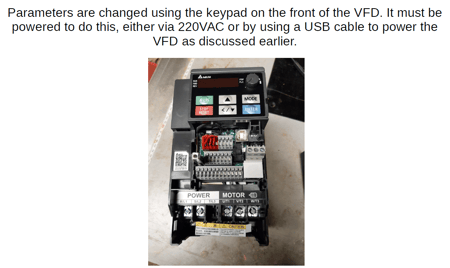 Entering parameters will go like this:
Power on the VFD.
F60.0 will be displayed
Press the ENTER button
00. will appear on screen
Use up and down arrow keys to select section to program ( ex: 05)
Press ENTER again
05.00 will appear on screen
Use up and down arrows to select parameter to change. The second two digits
will change. Press ENTER
Use up and down arrows to change that parameter. Second two digits will
display new setting. Press Enter to save. END will flash on screen to indicate
setting is saved.
Section 01 parameters
● 01-00 Max output frequency. This sets max rpm for the motor. Powermatic recommends settings
between 132 and 138. I set mine at 135 which gives me about 1200 rpm on the spindle in the
slow belt position.
● 01-02 Max output voltage. 220 matches my motor voltage.
● 01-03 Mid point freq. Powermatic recommends 5.0
● 01-04 Mid point voltage. Powermatic recommends 20.0
● 01-07 Min output frequency. Powermatic recommends 5.0
● 01-08 Min output voltage. Powermatic recommends 20.0
● 01-12 Acceleration time. How long until motor gets to set speed. I used 5.0 sec.
● 01-13 Deceleration time. How long for motor to slow and stop. I used 5.0 sec.
Done and ready to run
Now all my physical wiring is finished, and all the operating parameters
are set. Time for a test run. The new VFD performs perfectly and my
lathe runs just like it used to. Mission Accomplished.